Fleet Inspections That Move From Driver to Shop — Without the Paper Trail
Replace disconnected inspection sheets, untagged photos, and delayed defect reporting with a connected digital workflow that moves vehicle condition information from the field to maintenance and back to the driver.
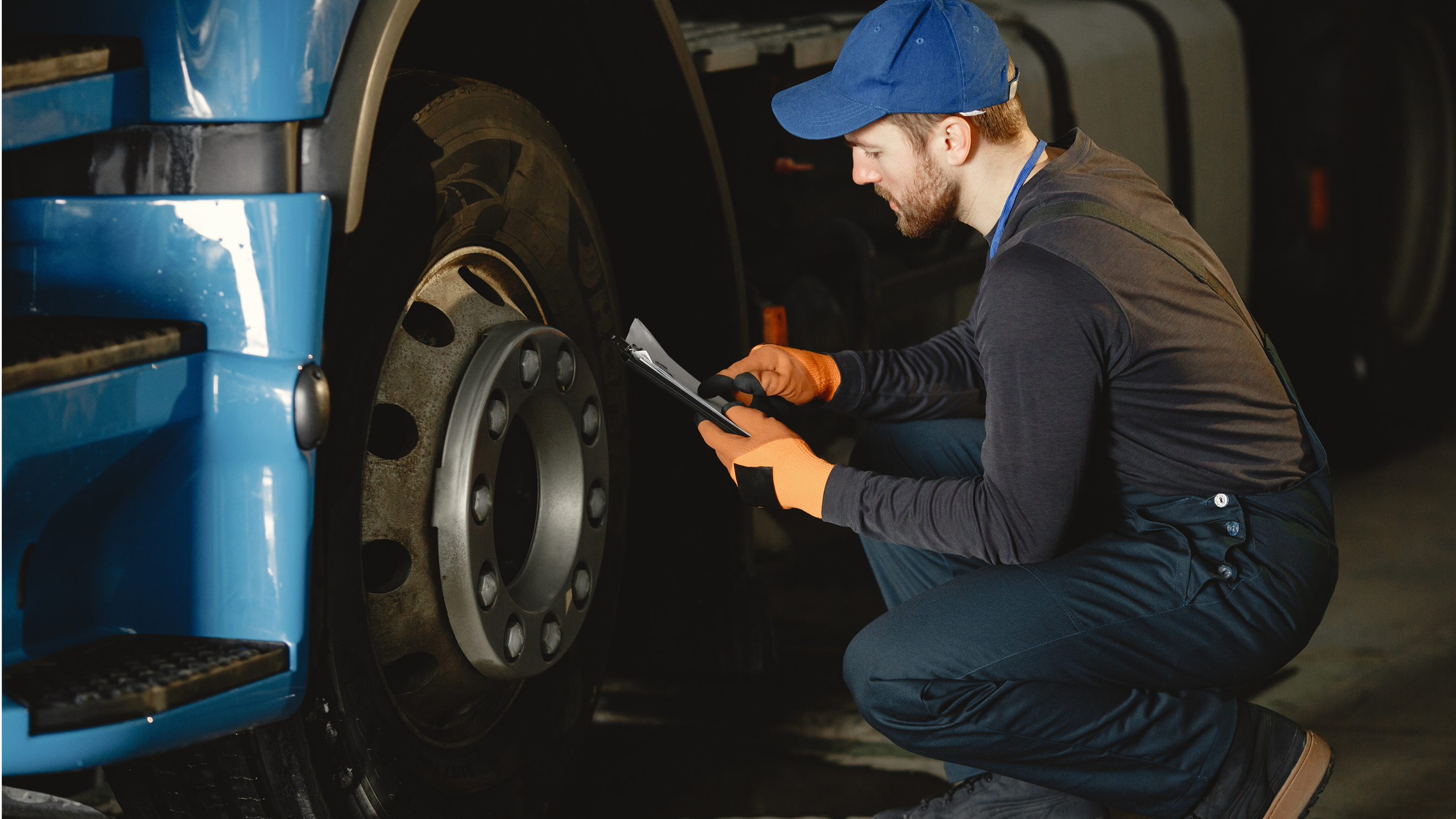
DRIVER / OPERATOR → VEHICLE INSPECTION → DEFECT → MAINTENANCE → VERIFICATION
Driver inspects
Defect identified
Maintenance notified
Repair recorded
Verified return
The Inspection Is Only Useful If the Defect Reaches the Right Person
Step through the paper loop and watch where hours, evidence, and accountability go missing.
Driver completes inspection
Delayed defect visibility
Fragmented evidence
Inconsistent workflows
Offline environments
Unclear maintenance handoff
Compliance record gaps
Every handoff in the loop is a person copying information from one place to another — and each copy is where the record breaks down.
See How aQRate Connects Field Work to Usable Records
Digital forms, offline field collection, evidence, connected records, review, reporting, and visualization — the general platform, in three minutes, before the fleet-specific walkthrough below.
One Connected Record From Inspection to Return-to-Service
The fleet-ready starter template calls its form DVIR-Fleet Inspection. Whatever the form is called, every submission follows the same loop.
Inspect
Submit
Triage
Repair
Verify
Return to Service
Each stage is a structured record — not a phone call, not a photocopy, not a recollection from this morning's radio chatter.
Give Drivers a Digital Inspection Workflow Built for the Vehicle
Inspection forms are configured around vehicle and equipment types — a tandem dump truck is not asked a lowboy's questions.
The Fleet management template ships with a DVIR-Fleet Inspection form that already branches by asset: tandem dump truck (Peterbilt 389, Mack Granite, Western Star 4900), highway tractor (Kenworth T880, Freightliner Cascadia), and lowboy trailer (Trail King 50T, Fontaine Magnitude) — each with its own make/model question, plus odometer, brake status, and tire status.
- Mobile inspection forms
- Required fields
- Conditional logic by vehicle type
- Asset identification (Asset ID)
- Photos on the record
- GPS/location where useful
- Signatures
- Date and time stamps
- Offline operation
Location capture is available where the workflow calls for it — it is not required for every inspection.
Inspection Type is the first required question — the record knows which end of the day it covers.
Every inspection is pinned to one vehicle, trailer, or machine — TRK-804, not "the blue Pete".
Pass/Fail checkbox groups become structured findings a dashboard can count.
Where the inspection happened, and how many km the asset had carried.
Keep Inspecting When the Network Doesn't
Heavy fleets run where signal is worst — aggregate pits, resource sites, rural haul roads, and construction jobsites. aQRate's mobile apps keep supported inspection workflows running without connectivity.
Offline inspection
Stored on device
Connectivity returns
Synchronization
Fleet / maintenance review
Construction sites
Aggregate pits
Rural operations
Resource sites
Large yards
Remote haul roads
Turn a Defect Into an Actionable Maintenance Record
A checkbox that says Fail is not a plan. Structure moves it: Inspection Finding → Defect Classification → Evidence → Maintenance Action → Repair Record → Verification.
Finding
Classify
Evidence
Action
Repair record
Verification
No maintenance action required. The inspection stands on its own as the record of the day.
Record the finding and route it for follow-up on the organization's schedule.
Flag the asset for the maintenance workflow the organization has configured — rules and people decide, not the app.
aQRate structures and routes findings — it does not independently determine legal out-of-service status. That determination stays with your configured rules and the people responsible for them.
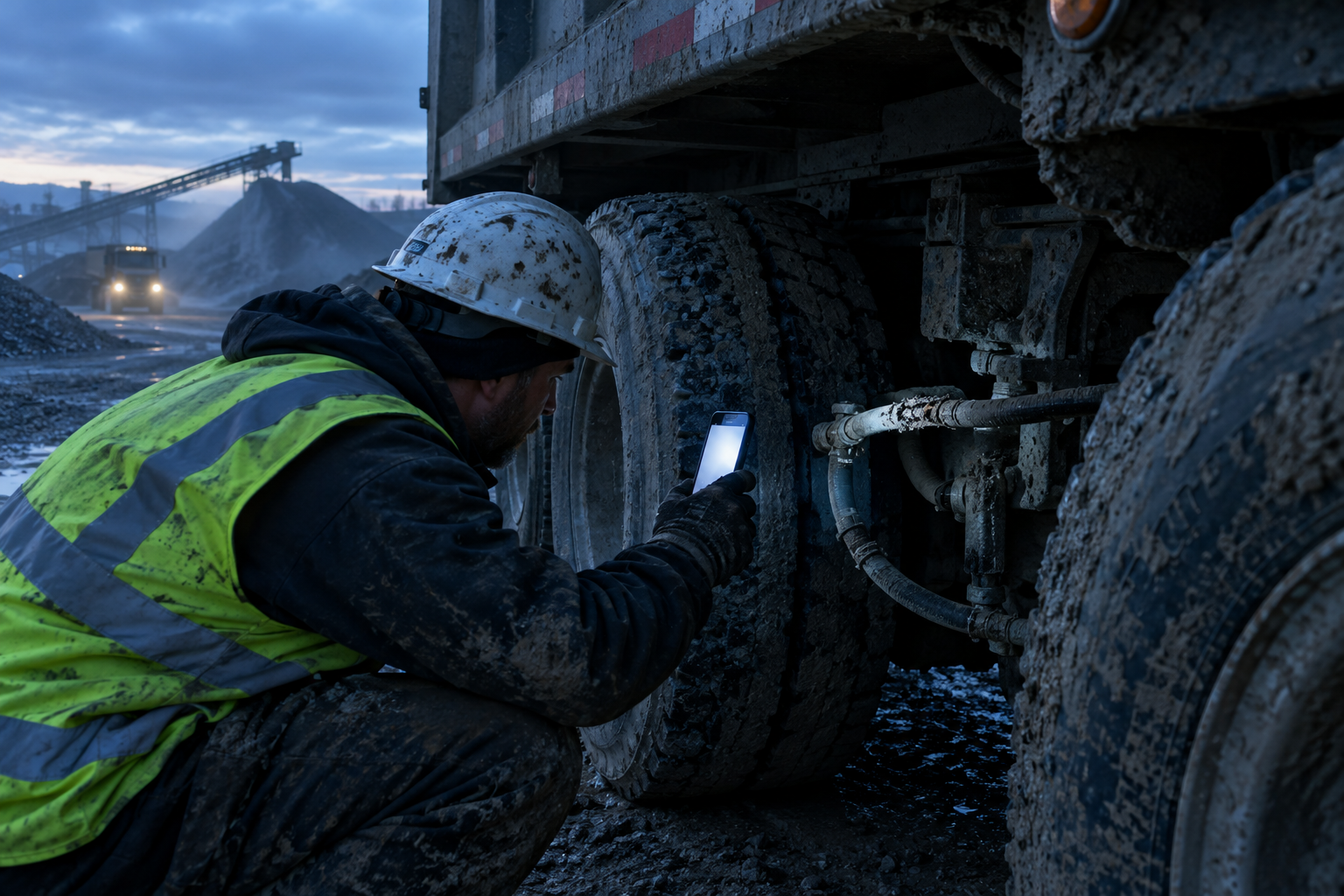
Keep the Evidence With the Vehicle Record
The photo is not just a file. It is evidence attached to a specific inspection, asset, finding, and date — brake-line damage, tire condition, steering components, lighting, coupling condition, hydraulic leaks, structural damage, equipment condition.
Asset ID
TRK-804 — Tandem Dump Truck (Mack Granite)
Inspection Date
Pre-trip, 05:41, at the pit gate
Driver / Inspector
Signed digitally, on the record
Finding
Brake-line damage — abrasion near rear axle
Severity
Major defect — out of service per company rules
Photo
Attached to this finding, this inspection, this asset
Notes
Driver description in the driver's own words
Maintenance Action
Routed to shop queue the same morning
Verification
Follow-up DVIR confirms the repair
Illustrative record structure from the fleet demo — field names follow your form, not ours.
Move From Defect Report to Shop Action
The inspection record becomes the structured information used to initiate or support the maintenance handoff — driver submits, fleet manager sees it, the vehicle is flagged, the shop receives it, the repair is recorded, the repair is verified.
Driver submits the defect
05:41, at the pit gate, photos attached
Fleet manager sees the record
the same morning, in the maintenance view — not at the end of the week
Vehicle flagged for maintenance review
the queue, not a phone call
Shop receives the information
finding, severity, evidence, asset
Repair recorded
work performed, on the record
Repair verified
loop closed before the truck rolls again
aQRate does not automatically create work orders in a CMMS unless a specific integration is configured — exports, APIs, and webhooks carry the structured record across.
Don't Stop at the Repair
A repair that is not verified is a hope, not a record. The loop has six stages — and the demo runs them on a single asset so you can follow the whole chain.
Defect found
Pre-trip DVIR, TRK-804
Repair performed
Shop, same afternoon
Repair recorded
Work, parts, time on record
Verification required
Status held until checked
Verification completed
Follow-up DVIR passes
Returns to service
Loop closed
Illustrative Demo Scenario — asset TRK-804, brake-line finding. Not a real customer deployment.
See the Fleet From Every Operational Angle
Once inspection records are structured and connected, the same underlying fleet data can be viewed at different levels — from fleet-wide KPIs down to an individual asset's history. These are actual outputs from the fleet-management demo use case.
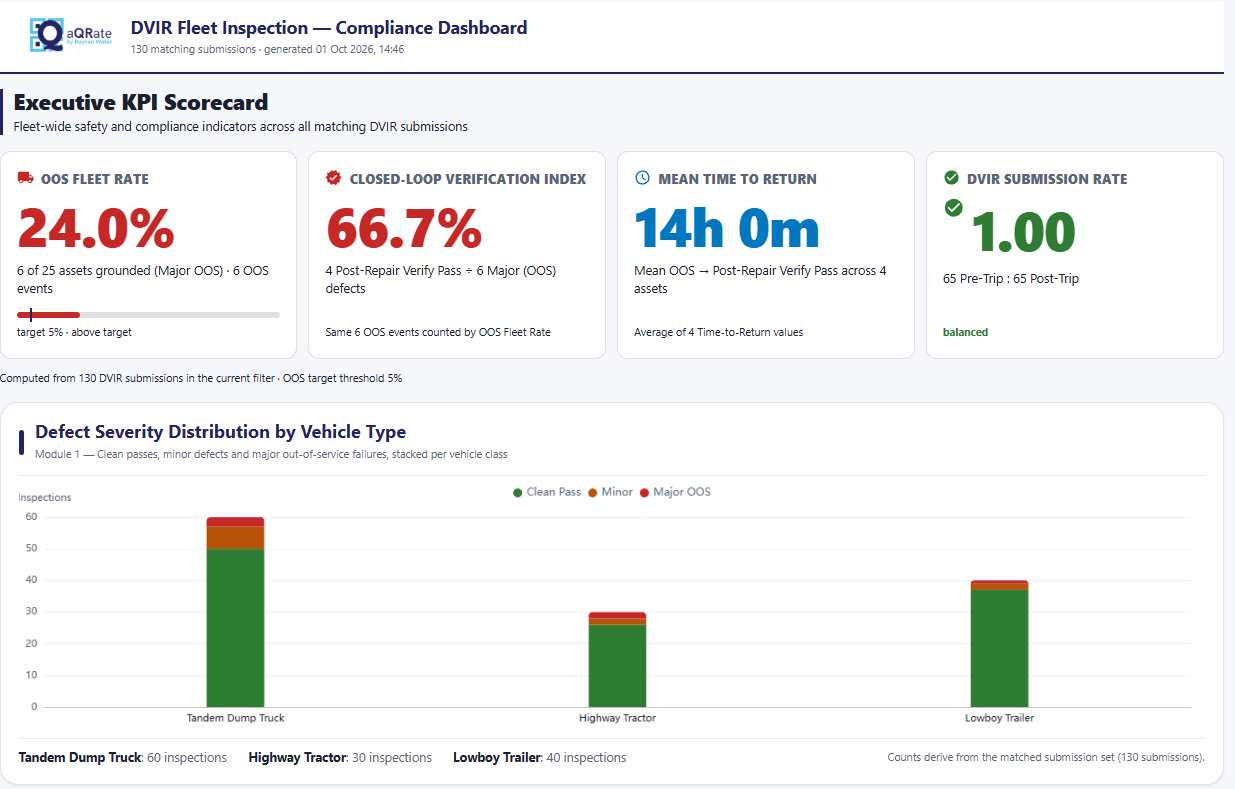
Fleet-level KPI dashboard from the illustrative fleet-inspection demo.
The KPI dashboard gives fleet managers the management-level view: inspection activity, pass/fail status, defect counts, maintenance-related findings, and fleet-level exceptions — the configured KPIs their workflow depends on.
Inspection activity
Pass / fail status
Defect counts
Maintenance-related findings
Fleet-level exceptions
Other configured KPIs
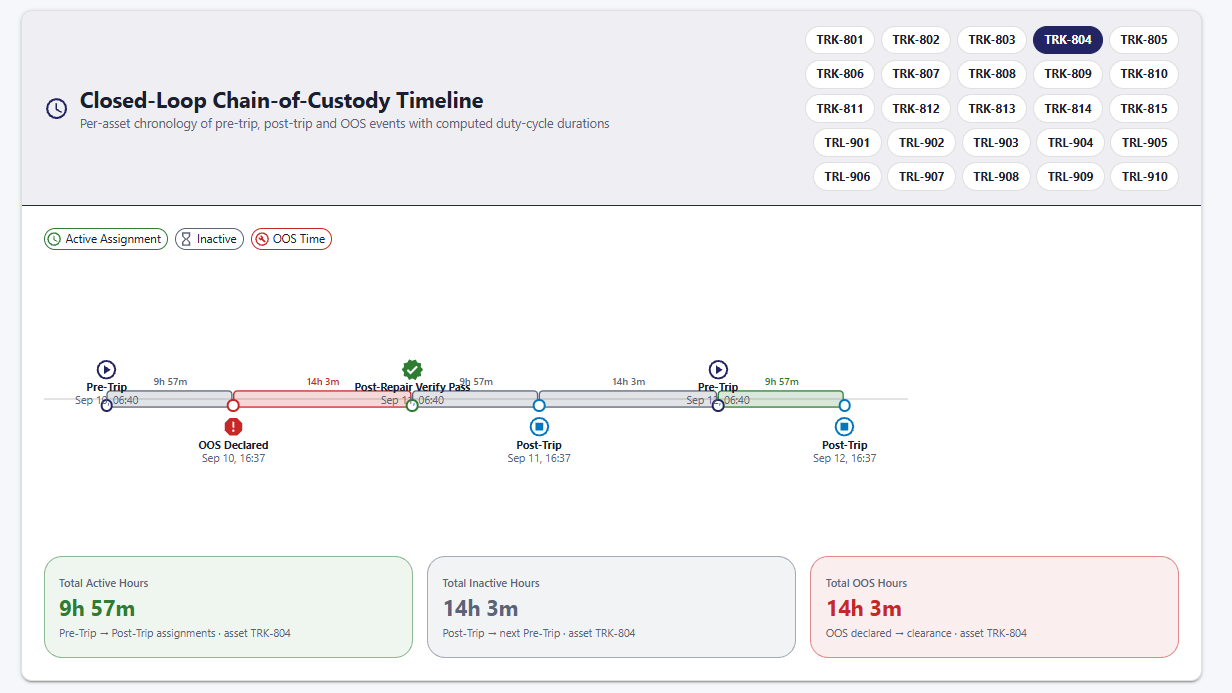
Timeline visualization from the illustrative fleet-inspection demo.
A single inspection tells you what happened today. A connected history tells you what has happened over time — previous inspections, defects, repairs, follow-up, verification, and recurring events per asset.
Previous inspections
Defects and repairs
Follow-up and verification
Recurring events
Per-asset history
One Dataset. Multiple Views.
These are not separate datasets. The KPI dashboard, and the per-asset timeline are different ways of interpreting the same structured inspection information.
KPI Dashboard
fleet-level status and exceptions
Timeline / Asset History
inspections, defects, repairs over time
Same Connected Fleet Records
one structured inspection dataset
Capture once. Connect the record. Use the information wherever the workflow requires it. Visualizations are configured around each customer's workflow and available data — not every customer receives the same dashboard or timeline.
The dashboard above shows the same dataset. What the fleet demo contains:
130
DVIR submissions
25
representative assets
113
clean passes
11
minor defects
6
major out-of-service defects
Where aQRate Fits — and Where It Doesn't
aQRate is the field inspection, evidence, workflow, and connected-record layer around your fleet operation. It is not a replacement for every category of fleet software — and it won't pretend to be.
Keep your telematics. Keep your ELD. aQRate sits where those systems don't: turning what the driver saw and photographed this morning into a structured, reviewable, connected record — with reports, exports, and supported integrations (APIs, webhooks) for the downstream systems that need the data.
Not a replacement for: Telematics / GPS tracking
Not a replacement for: ELD systems
Not a replacement for: Fuel management
Not a replacement for: Route optimization
Not a replacement for: Full ERP systems
Not a replacement for: Full CMMS / EAM platforms
Not a replacement for: Parts inventory systems
Not a replacement for: Accounting systems
Not a replacement for: Specialized vehicle diagnostics
Built for Fleets Where Inspection and Maintenance Can't Be Disconnected
If a defect found at 5:40 a.m. still isn't in the shop's hands by mid-morning, this is your section.
Heavy Civil Contractors
Dump trucks, trailers, lowboys, service vehicles, and heavy equipment moving between sites.
Hauling & Transportation Companies
Commercial trucks, tractors, trailers, and vocational fleets running pre- and post-trip DVIRs.
Construction Fleets
Mixed equipment operating across distributed jobsites where paper never makes it back to one office.
Resource & Remote Operations
Fleet assets operating where connectivity is inconsistent — pits, plants, and remote haul roads.
Fleet Maintenance Teams
The shop teams responsible for turning inspection findings into maintenance action and records.
Fleet Compliance / Safety Teams
The people responsible for inspection records, evidence, review, and audit readiness.
Workflow First, Not a Feature Grid
Every capability below earns its place by closing part of the loop: Inspect → Defect → Act → Repair → Verify → Return to Service.
Digital Fleet Inspection Forms
Configure inspection workflows around vehicle and equipment types.
Offline Mobile Collection
Continue supported inspection workflows without connectivity.
Conditional Forms
Show relevant questions based on vehicle type or inspection response.
Asset Identification
Connect inspections to a specific vehicle, trailer, or equipment asset.
Photo Evidence
Keep inspection photos connected to the relevant record.
Defect Classification
Structure findings according to your workflow — pass, minor, major.
Digital Signatures
Capture sign-offs at relevant workflow stages.
Connected Records
Keep inspection, evidence, maintenance, and verification information associated.
Dashboards & Visualization
Turn inspection records into fleet-level views, maps, timelines, and trends.
Reports & Exports
Produce defined reports and structured outputs — including the Fleet Compliance DVIR Audit PDF report.
Integrations
Use supported APIs, webhooks, or exports where downstream systems require the data.
See the Fleet Inspection Workflow in Action
From Paper DVIRs to Instant Shop Dispatch: Streamlining Heavy Fleet Inspections and Maintenance Compliance — an illustrative scenario run on representative fleet data.
01 — Driver Inspection
Vehicle inspection completed digitally, pre-trip, in the field.
02 — Defect Identified
The driver records the finding and attaches the evidence.
03 — Maintenance Handoff
Fleet and maintenance receive the information without waiting for the truck.
04 — Repair
The mechanic records the work performed on the connected record.
05 — Verification
A follow-up inspection verifies the repair.
06 — Return to Service
The workflow closes the loop.
The Real Fleet Inspection Form, Built Live
The Fleet management starter template's DVIR-Fleet Inspection form — the exact workflow this page sells — configured and filled in, field by field.
DVIR-Fleet Inspection
Inspection Type*
Asset ID*
Inspection Date*
Inspection Time*
Inspection Location*
Vehicle Type*
Tandem Dump Truck - Make/Model
Highway Tractor - Make/Model
Lowboy Trailer - Make/Model
Odometer (km)
Brake Status*
Tire Status*
DVIR-Fleet Inspection
Post-Trip
TRL-910
2026-09-11T00:00:00.0000000Z
16:09:00
53.5627, -113.4644
Lowboy Trailer
N/A
N/A
Fontaine Magnitude
0
Pass
Pass
Report ready: Fleet Compliance DVIR Audit
From Signup to a Connected Fleet Inspection Workflow in Six Simple Steps
Start with one inspection workflow if that is what you need. Expand when the loop is closed.
Download the mobile app
Install the aQRate app for your crews — iOS and Android, with offline collection built in.
Build or choose your inspection form
Configure the workflow around vehicles, inspection requirements, defects, evidence, and sign-offs — or start from the Fleet management template.
Inspect vehicles in the field
Drivers and operators collect the required information through the mobile app, including supported offline workflows.
Review and act on submissions
Fleet and maintenance teams review inspections, findings, evidence, and required follow-up.
Generate records, reports, and visualizations
Turn completed inspections into fleet history, reports, exports, and operational views.
Questions Fleet Managers Ask First
Yes. The mobile apps support offline inspection workflows: the record is stored on the device and synchronizes automatically when connectivity returns. Field crews never lose a submission to a dead zone.
Yes. Forms are configurable per asset type, with conditional logic — a tandem dump truck gets its own make/model questions and inspection items, a lowboy trailer gets different ones.
Yes. Photos captured during the inspection stay connected to the specific submission, asset, finding, and date — not to a camera roll someone has to sort through later.
Yes. Findings, workflow status, repair information, and verification can all be configured on the connected record, so a defect has a traceable path from identification to verified return to service.
No. aQRate is the field inspection, evidence, workflow, and connected-record layer — not telematics, ELD, fuel management, route optimization, or a full CMMS/ERP. Structured exports, APIs, and webhooks can carry inspection data to those systems where an integration is configured.
Yes — through supported exports, REST APIs, and webhooks, where downstream systems require the inspection data.
Yes. Many organizations start with a single focused workflow — one form, one asset type — and expand as crews adopt it. The Fleet management template is a ready-made starting point.
Replace the Paper Inspection Loop With a Connected Fleet Workflow
Bring your current inspection form, defect workflow, or maintenance handoff. See how aQRate can connect the field record to the next person who needs to act on it.